How to Automate Employee Onboarding: A Practical Guide

How to Automate Employee Onboarding Without Losing the Human Touch
To automate employee onboarding, trigger a sequence of communications and content off your HRIS so each new hire gets the right message at the right moment, from the offer through their first 90 days, across email, Slack, Teams and SMS. The goal is to automate the production and delivery, the parts that eat your team's hours, while keeping the human moments human. Automating the comms and content, not just the task list, is where most of the time is saved.
Onboarding is repetitive by nature. Every new hire needs a welcome, a first-day plan, the same benefits explainer, a nudge to their manager, a check-in at 30 days. For a People team supporting a few thousand employees across several locations, doing that by hand for every starter is a quiet, permanent drain on the week.
Onboarding automation software like ChangeEngine fixes that, but the word scares people for a good reason: nobody wants onboarding to feel like a robot processed them. So this guide separates the parts worth automating from the parts worth protecting, then walks through how to actually set it up.
What to automate, and what to leave alone
Most advice on automating onboarding is really about automating tasks: provisioning a laptop, collecting a form, ticking a compliance box. That matters, and your HRIS or an IT tool handles it. But the tasks were never the part that made onboarding feel good or bad. The communications were.
The useful split is between the work of producing and sending things, which should be automated, and the moments of human judgment and connection, which should not. Automating the first is what frees up time for the second.
The pattern holds across every row: automate the trigger, the production and the delivery, and protect the one human moment that actually matters at that stage. A new hire should never be able to tell that their welcome email was automated. They should only be able to tell that it arrived, on time, and felt like it was written for them.
6 ways to automate employee onboarding
1. Automate the pre-start window, not just day one
The gap between a signed offer and the first day is where new hires get cold feet, and it is almost always silent. Automating this window means a welcome goes out the moment your HRIS marks someone as hired, followed by a short what-to-expect sequence: who they will meet, what day one looks like, what to bring.
Because it fires off the HRIS event rather than a person remembering, it happens for every hire, including the ones who start in a busy month when your team has no time. A distributed team hiring across time zones gets it right automatically, with each message timed to the new hire's local morning rather than head office hours.
2. Automate the day-one welcome across every channel
Day one is the moment most worth getting right and the easiest to reach unevenly. A desk hire opens their laptop to a branded welcome and a first-day agenda. A frontline hire with no company inbox gets the same welcome by SMS, and a printed version waiting at their site.
Automating across channels is what stops frontline and deskless staff from being second-class starters. One message, written once, goes out as an email, a Slack or Teams post, an SMS and a poster, so everyone gets the same welcome in the format that reaches them.
3. Automate the 30, 60 and 90-day sequence
Onboarding is not a day, it is a quarter, and the later touches are the ones that get dropped first when your team is stretched. Automating the 30-60-90 sequence means check-in nudges, training reminders and pulse surveys fire on each new hire's tenure milestones without anyone tracking dates in a spreadsheet.
This is where automation earns its keep on retention. The check-in that would have been forgotten still happens, the manager still gets prompted, and the new hire still feels tracked and supported through the window when most early attrition occurs.
4. Automate the content itself, not just the sending
This is the step most onboarding automation skips, and it is the one that consumes the most time. Scheduling an email is easy. Writing and designing 30 pieces of onboarding content per program, the handbook, the role guides, the posters, the welcome video script, is the work that never gets faster on its own.
Automating content generation means creating those assets from a short prompt, in your brand, rather than briefing a designer or starting from a blank page. This is the difference between automation that saves you clicks and automation that saves you a job's worth of production. It is also what makes personalization realistic: a role-specific guide for every role stops being a luxury when the first draft takes seconds.
5. Automate manager and buddy prompts
A new hire's experience is made or broken by their manager, who is also the person with the least time to think about onboarding. Automating manager and buddy prompts means the right nudge lands in their inbox or Slack at the right moment: assign a buddy on day one, book a one-to-one in week one, run a check-in at day 30.
The manager still does the human part, the conversation. Automation just makes sure they never miss the cue, which is the thing that actually goes wrong in practice.
6. Automate measurement
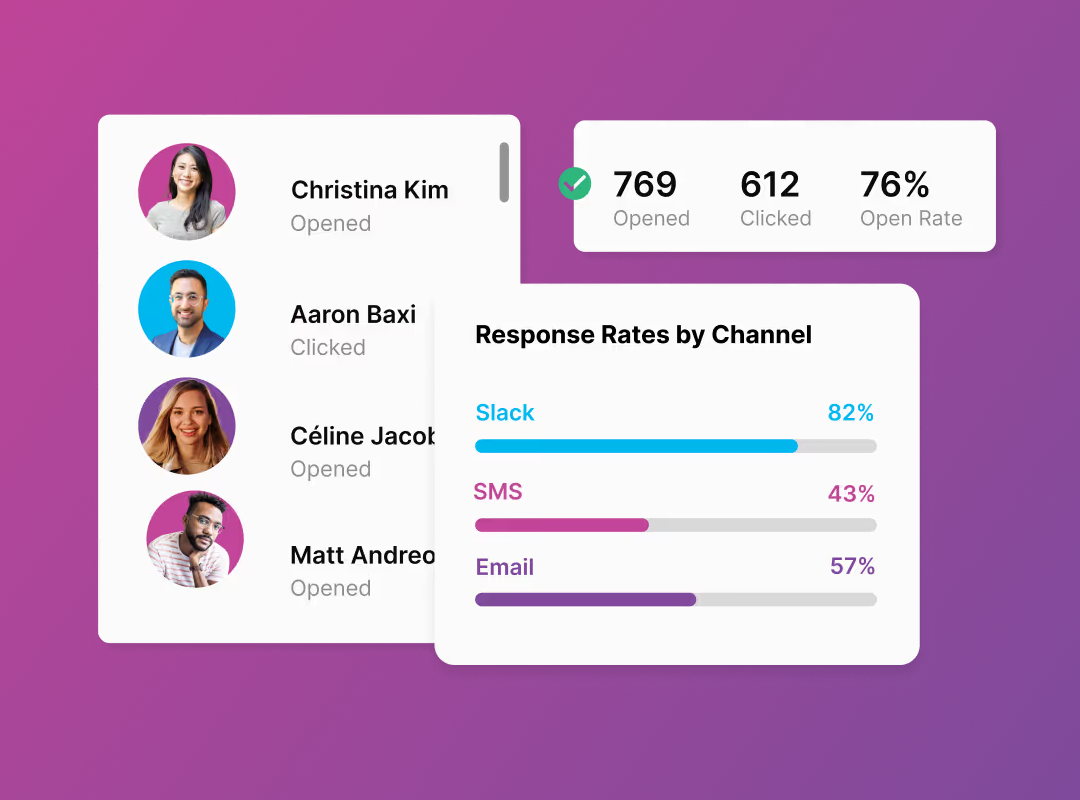
If you cannot see what landed, you cannot improve it, and manually chasing onboarding feedback is its own part-time job. Automating measurement means open, click and completion data collects itself by segment, so you can see that your field staff are engaging with week-two content at half the rate of your head-office hires, and fix it.
This is the part a task checklist cannot give you. A ticked box says a form was submitted. Engagement data says whether onboarding is actually reaching people, which is the question worth answering.
How to set up onboarding automation, step by step
The setup is more straightforward than most teams expect, because the sequence is the same for every hire once it is built. A practical order:
- Connect your HRIS. Automation triggers off employee data, so link Workday, ADP, BambooHR or your system of record first. This is what turns a start date into an automatic action.
- Map the journey. Lay out the moments from offer to first anniversary, and decide what fires at each one. The table above is a starting template.
- Segment by role and location. A frontline hire and a head-office hire should not get identical content after day one. Branch the journey by the fields your HRIS already holds.
- Build the content once. Create the welcome, the guides and the check-ins as reusable, on-brand assets, so the journey has something real to send.
- Choose channels per segment. Email and Slack for desk staff, SMS and print for frontline, so every message reaches its audience.
- Turn it on and watch the data. Let it run for a cohort, read the engagement by segment, and adjust the weak points.
Built once, it runs for every hire after that. The team that spent a day a week on onboarding admin gets most of that day back, and can spend it on the human moments the automation deliberately left alone. Teams typically save around 20 hours of admin per new hire and cut onboarding admin by roughly 60% this way.
What you should never automate
Automation has a clear limit, and crossing it does more damage than doing nothing. Keep these human:
- The manager's first personal message. A templated note from a manager reads as exactly that. This one should be written by the person, even if the prompt to write it is automated.
- Reading and acting on feedback. Automating a survey is fine. Automating the response to it is how you end up with data nobody uses and new hires who learn their input goes nowhere.
- Difficult or sensitive conversations. Anything involving performance, wellbeing or a struggling start belongs to a person, immediately, not a sequence.
- The buddy relationship. You can automate the pairing and the prompt. You cannot automate two people actually getting on, and pretending otherwise is obvious to a new hire.
The test is simple: automate the logistics of connection, never the connection itself.
Frequently asked questions
How do you automate employee onboarding?
You automate employee onboarding by connecting your HRIS and triggering a sequence of communications and content off employee events, so each new hire automatically receives the right message from offer to day 90. The most effective approach automates content production and multi-channel delivery, not just task tracking, because producing and sending onboarding material is where most of the manual time goes.
What parts of onboarding should not be automated?
The human moments should stay human: a manager's personal welcome, acting on survey feedback, sensitive conversations, and the buddy relationship itself. Automation should handle the logistics, triggering, producing and delivering communications on time, while people handle judgment and connection. A good rule is to automate the work around a moment, never the moment itself.
Can AI automate employee onboarding?
AI automates the most time-consuming part of onboarding: creating the content. It can generate welcome emails, handbooks, role guides and posters in a consistent brand voice in seconds, which removes the production bottleneck that stalls most programs. AI is strongest at content generation and message timing, and weakest at the human judgment onboarding still depends on, so it assists rather than replaces the People team.
How do you automate onboarding communications?
Automate onboarding communications by building each message once, then triggering it off an HRIS event and delivering it across the channels a new hire actually uses: email, Slack, Teams and SMS. Personalize by role and location using existing HRIS fields, and track opens and clicks so you can see which messages landed. This reaches frontline staff a single-channel tool would miss.
What is the best way to automate onboarding for frontline workers?
For frontline and deskless workers, the best approach delivers onboarding by SMS and printed formats alongside digital channels, because most have no company email or laptop. Trigger the sequence off the HRIS and send the same content by the channel that reaches each group, so a field hire and a head-office hire get an equal onboarding from one automated program.
About ChangeEngine
ChangeEngine is marketing automation for HR and People teams. It automates onboarding by triggering branded communications and content off HRIS events, delivered across email, Slack, Teams and SMS and measured end to end. One message becomes an email, a Slack post, a poster and an SMS. Teams save around 20 hours of admin per new hire and reach 5x faster program adoption. ISO 27001, SOC 2 and GDPR compliant, with integrations across Workday, ADP, BambooHR and 75+ others.
Book a demo to see an onboarding program automated in your brand.